Tuesday, April 14, 2020

Hidden Networks: Nueva Versión Con "TimeLine"

La C0r0n4CON surgió como un evento de un día en el que se buscaba donaciones para la Cruz Roja. El evento fue creciendo y acabó siendo un evento de 4 días con 4 salas en paralelo. Cuando Carlos Rodríguez me invitó a participar, por supuesto no lo dudé. Vi como el evento creció y todo el mundo quiso poner su granito de arena. El enfoque del evento creció para que todo el mundo pudiera aprovechar, aprender, conocerse y disfrutar del conocimiento de todos durante 4 días.

Figura 1: Hidden Networks: Nueva versión con "TimeLine"

Tanto mi compañero Fran Ramírez y yo pensamos en una charla que pudiera ser de interés por su ámbito forense, pero que a la vez fuera algo que pudiera ser de interés para todos. Los dispositivos USB y el rastro que éstos dejan son de interés para todo el mundo, hablando de nuestro proyecto de Hidden Networks. Como comentamos en la charla, este fue un proyecto que empezamos a trabajar hace un par de años en el departamento de Ideas Locas, pero que venía de una idea de Chema Alonso del año 2014.


Figura 2: Codetalk for Developers: Hidden Networks

En el año 2018 hablamos de ellas en Rooted Valencia, y dimos una CodeTalk For Developers hablando de las Hidden Networks en ElevenPaths, ya que fue el año que se presentó el proyecto y la herramienta, en su primera versión. Desde entonces, es cierto que hemos ido añadiendo alguna funcionalidad, pero por cuestión de tiempo y optimización de código no hemos publicado aún lo nuevo.

Prometemos actualización

Durante la charla comentamos que tenemos una actualización de la herramienta, ya que desde 2018 no se actualizaba. Así que durante estas dos próximas semanas prometemos tenerla publicada. Estamos "puliendo" ese código.

Figura 3: Hidden Network Python

Eso sí, os dejamos el enlace al Github de la herramienta, tanto de la herramienta con nuestro querido Python que tanto adoramos los pentesters, como podéis ver en la Figura 3, como sus inicios con los scripts en Powershell que también es una de nuestras herramientas favoritas para hacer pentesting.

Figura 4: Hidden Network PowerShell

Los dispositivos USB y los incidentes de seguridad

En la charla comenzamos hablando sobre la historia del USB, el empujón histórico que Steve Jobs le da quitando los Legacy del iMac G3 por dos puertos USB, hasta cómo el USB ha estado involucrado en una gran cantidad de incidentes de seguridad. Seguramente los incidentes de seguridad más conocidos serían Stuxnet o Brutal Kangaroo entre otros.

Figura 5: Algunos incidentes con USB

Comentando un poco estos, llegamos a hablar de Rubber Ducky - o nuestro querido Arducky - como vector de ataque a través de un USB con un enfoque muy distinto, ya que se hace uso de USB para disponer de un teclado virtual. Otra de las amenazas mostradas fue USB Killer, como un ataque físico para una denegación de servicio completa del equipo.


Pero el volumen de ellas es cada vez más alto y no para de crecer, como por ejemplo el USB Ninja que utiliza Kevin Mitnick en sus presentaciones.

¿Qué es una Hidden Network? 

Una "Red Oculta" por definición para nuestro proyecto es una red abstracta generada por el camino que ha seguido un dispositivo USB. Esto es importante de entender, ya que no tiene que ver con arquitectura TCP/IP. Esto puede llevar a error. Debemos entender que una red oculta es el número de nodos (equipos) por el que una tecnología ha pasado. No solo tiene por qué ser un USB. Este mismo ejercicio se podía hacer con tecnología Bluetooth

Figura 7: Equipo "desconecado" de la red cable y WiFi

Entonces, si tenemos una red inventariada en nuestra organización, pero no controlamos por qué equipos van pasando diferentes dispositivos USB, podemos estar creando un bypass de reglas de red o, directamente, estar conectando una red aislada con Internet

Figura 8: Creación de una Hidden Network

Otra forma de visualizar esto podría ser el siguiente esquema. Lo importante es que la idea quede clara. Debemos controlar la trazabilidad de estos dispositivos. Si existe un incidente de seguridad y tenemos indicios de que el vector de acceso ha sido el USB, se podrá trazar los equipos o nodos por los que éste ha ido pasando gracias a la herramienta Hidden Networks

Primera idea: Conceptos y Powershell 

Cuando surge la idea empezamos a trabajar con Powershell para poder conectarnos con las máquinas Windows de manera sencilla, pensando en una organización. Empezamos a trabajar en ver qué parámetros o información deja un dispositivo USB.

Figura 10: Pentesting con PowerShell 2ª Edición

Llegamos al querido registro de Windows dónde hay mucha información.  Lo primero que hay que decir es que es un hive HKLM, por lo que para poder "tocar" o poder "eliminar" cierta información habría que tener privilegio en la máquina, pensando en un "anti-forensic".

Figura 11: Información de USB en el Registro de Windows. 

Como se puede ver en la Figura 11, accediendo al registro de Windows hay muchas cosas que se pueden saber sobre qué dispositivos se han conectado. Tal y como se observa la información que se puede sacar a priori es:
- USB Serial Number: Este identificador es único para los dispositivos USB y se repite si lo llevamos a otro equipo. Gracias a él podremos rastrear el paso de un equipo a otro. Además, da nombre a la clave.  
- El Container ID: Este es un identificador único en la máquina, pero si llevamos el dispositivo a otra máquina, se generará un nuevo Container ID.  
- FriendlyName: El nombre del dispositivo. Gracias a esta información se podrá obtener la imagen del dispositivo USB. 
Esto fue la primera aproximación, ya que hay que tener en cuenta que las fechas de inserción (de la primera conexión) en el equipo pueden obtenerse y será un dato fundamental para reconstruir la línea temporal que vamos a preparar.

Figura 12: Mapa de conexiones USB en línea temporal generada con Gephi

El script devolvía por pantalla los dispositivos de una máquina, pero lo interesante era generar un CSV con toda esa información de todas las máquinas. De esta manera, empezamos a trabajar con Gephi, una librería para generar grafos. Como se puede ver la idea de la línea temporal o "TimeLine" ya la teníamos en la cabeza, pero nos faltaba darle sentido a las direcciones de los arcos. 

Segunda idea: Python y herramienta final 

Nuestro compañero Fran Ramírez propuso hacer la herramienta en Python y darla mayor entidad. En la siguiente imagen se puede ver la GUI de Hidden Networks. Tienes una descripción completa del interfaz y cómo se utiliza en el artículo que escribimos en este blog: Hidden Network "Una herramienta de ElevenPaths para detectar las redes ocultas en tu empresa".

Figura 13: Interfaz de Hidden Networks

Pero cuando acabamos la herramienta, empezamos a pensar en el enfoque más dirigido al Análisis Forense, por lo que perseguimos el obtener los datos de conexión de los dispositivos, ya con el Timeline muy en la cabeza, exprimiendo al máximo la potencia de nuestra herramienta escrita en Python.

Figura 14: Técnicas de  Análisis Forense Informático para Peritos Judiciales
de Pilar Vila

Y si quieres verla en funcionamiento, en el siguiente vídeo tienes tal y cómo funcionaba nuestra Hidden Network Tool creada en 2018. Sin tener aún desarrollada la opción del TimeLine en las conexiones de los dispositivos USB.


Figura 15: Hidden Network Tool escrita en Python

Para hacer el TimeLine de conexiones, el archivo setupapi.dev.log de la ruta c:\windows\inf dispone de la información de la fecha de inserción del dispositivo USB. Esto nos da todo lo necesario para poder generar un timeline e incorporarlo a la herramienta en forma de grafo dirigido.  Pero estuvimos pensando en qué más cosas se puede sacar, y vimos que se puede sacar el usuario o usuarios que tenían habilitada la sesión en el equipo en el momento de inserción del dispositivo

Figura 16: Archivos setupapi.dev.log

A continuación, se muestra una captura de un grafo dirigido para un USB TransMemory insertado en todos estos equipos y con sus fechas de inserción. Además, una de las últimas características añadidas fue la posibilidad de poder consultar la imagen del pendrive o del dispositivo USB.

Figura 17: TimeLine de conexiones de un Pendrive

De esta forma, se puede obtener un dato gráfico que puede ayudarnos a buscar el foco de infección de forma física. Es más fácil conocer qué buscar, que ir comprobando el USB Serial Number de todos los dispositivos de la organización. Para acabar, os dejamos el enlace al paper de Hidden Networks para que podáis conocer y estudiar en mayor profundidad el detalle. 


Y ya para terminar, os dejamos el vídeo completo de la charla que dimos mi compañero Fran y yo sobre Hidden Networks en C0r0n4CON. Esperamos que os guste y que probéis la herramienta sobre vuestra red. 

Figura 19: Hidden Networks en C0R0N4CON


Esperamos que estos proyectos que llevamos desde el equipo de Ideas Locas os sean de utilidad, y os estimulen a crear cosas nuevas. Por supuesto, más que abiertos estamos a que colaboréis con nosotros en todos ellos.

Saludos,

Autor: Pablo González Pérez (@pablogonzalezpe), escritor de los libros "Metasploit para Pentesters", "Hacking con Metasploit: Advanced Pentesting" "Hacking Windows", "Ethical Hacking", "Got Root",  "Pentesting con Powershell" y de "Empire: Hacking Avanzado en el Red Team", Microsoft MVP en Seguridad y Security Researcher en el equipo de "Ideas Locas" de la unidad CDCO de Telefónica.  Para consultas puedes usar el Buzón Público para contactar con Pablo González

Figura 20: Contactar con Pablo González

Related news


  1. Free Pentest Tools For Windows
  2. Pentest Tools For Mac
  3. Hacker Tools 2019
  4. Hacking Tools 2019
  5. Free Pentest Tools For Windows
  6. Pentest Tools Linux
  7. Underground Hacker Sites
  8. Hacking Tools For Games
  9. Tools Used For Hacking
  10. Pentest Tools
  11. Computer Hacker
  12. Hacking Tools For Kali Linux
  13. Hacker Tools Apk
  14. Hacking Tools 2019
  15. Hacker Tools Software
  16. Physical Pentest Tools
  17. Hacking Tools Kit
  18. What Is Hacking Tools
  19. Hacker Tools For Mac
  20. Hacking Tools For Kali Linux

Monday, April 13, 2020

Hacking PayPal's Express Checkout


Do you know what is happening in the background when you buy something in an online shop using PayPal?

In this post we will tackle the following problems:
  • How can PayPal's API be tested?
  • How does PayPal's Express Checkout work? You can find the detailed report here.
  • How can we debit more money than authorized?

How PayPal's API can be tested?

PayPal's Sandbox API

PayPal offers a feature called PayPal Sandbox Accounts, which mimics the production API. The basic idea is that a normal user/shop can test the API and make transactions without actually transferring money. This is the perfect tool for developers to test their API integration.

Access to all messages

The next question is how to get access to all messages. All browser-related messages can be inspected, intercepted, and modified via BurpSuite. The main problem here is how to get access to the server-to-server exchanged messages: the messages exchanged between PayPal and a shop. In order to solve this problem, we deployed our own shop. For this purpose we used Magento, which already has a PayPal integration.
Once we have our own controlled shop, we can enforce Magento to send all request through a proxy.
In the following picture you can see our setup.

Test suite for analyzing PayPal's API [1]

In order to capture the traffic between our Magento hhop and PayPal we proceeded as follows:
  • We configured Magento to use a proxy running on localhost:8081.
  • We connected the proxy port on the virtual machine with our local machine via SSH remote port forwarding by issuing the following command
    ssh -N -R 8081: localhost :8081 <IP of Magento shop>
  • We configured BurpSuite running on our local machine to listen on Port 8081 for incoming requests.
Now, we were able to see the entire traffic.
Please note that we uses our own, custom Magento shop in order to be able to test Paypal's API.

PayPal's Express Checkout

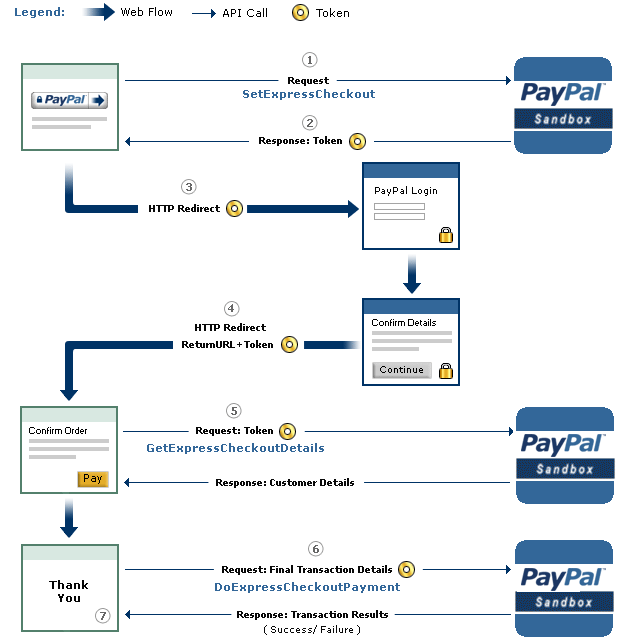
An overview of the checkout procedure is depicted in the following:

PayPal's Express Checkout [2]


Step 1: Magento tells the PayPal API where to redirect the user after authorizing the transaction via the parameter RETURNURL and requests a token for this transaction.
Step 2: The PayPal API provides Magento with the token.
Step 3: Magento redirects the user to PayPal's website. The redirect contains the token from the previous step.
Step 4:  The user authorizes the transaction. As a result, he will be redirected back to Magento (RETURNURL) with the token.
Step 5: Magento issues a request to the PayPal API to get the transaction details.

Step 6: Magento signals the PayPal API to execute the transaction.

Step 7: Magento serves the success page.

A more detailed view of the protocol and all parameters is shown on page 16 in the full version. We will concentrate only on step 6 and the parameters relevant for the attack.

The Attack

The goal of the attack is to let a shop (in our case Magento) debit more money than authorized by the PayPal user. The core of the attack is Step 6 -- DoExpressCheckoutPayment. Let's get a deeper look at this message:

Magento can raise the authorized amount and debit more money from the user's account

  • The shop sends the token, which was issued in the first step of the protocol and identifies uniquely the transaction through all steps. 
  • The PayerID referring to the user that authorized the payment.
  • The AMT defining the amount, which will be transferred.
  • The API Credentials authenticating Magento on PayPal.
  • The Version pointing to the release number of the API.

As one can imagine, the core problem we found was the change of the AMT parameter. This value can be freely chosen by the shop, despite the fact that the user has authorized a different amount.

We tested only the SandBox API, but refused to test the production API in order to avoid problems. We promptly contacted PayPal's security team and described the problem hoping that PayPal can and will test the production API against the attack.

The response of PayPal can be summarized as follows:
  • We don't get any BugBounty since we only tested the Sanbox API. (Fair enough)
  • In the Production API PayPal this flexibility is a wanted feature. Thus, PayPal allows a merchant to charge for shipping and/or other expenses different amounts. Any malicious behavior can be detected by PayPal. In case of fraudulent charges the consumer are protected by the Buyer Protection policy.
... but the Sandbox API was nevertheless fixed.

Authors of this Post

Daniel Hirschberger
Vladislav Mladenov
Christian Mainka (@CheariX)


[1] BurpSuite Logo
[2] PayPal Express Checkout

Related articles


  1. Hacker Hardware Tools
  2. Hacker Tools Hardware
  3. Hacker Tools Free Download
  4. Hacker Tools Software
  5. Kik Hack Tools
  6. Install Pentest Tools Ubuntu
  7. Top Pentest Tools
  8. Pentest Tools Tcp Port Scanner
  9. Hacker Tools For Mac
  10. Pentest Tools Linux
  11. Hacker Tools Apk
  12. Game Hacking
  13. Underground Hacker Sites
  14. Hacking Tools For Games
  15. Pentest Tools Find Subdomains
  16. Hacking Tools Download
  17. Hack And Tools
  18. Hack And Tools
  19. New Hacker Tools
  20. Termux Hacking Tools 2019
  21. Pentest Tools Nmap
  22. Best Hacking Tools 2019
  23. Pentest Tools Windows
  24. Wifi Hacker Tools For Windows

DOS (Denial Of Service) Attack Tutorial Ping Of Death ;DDOS

What is DoS Attack?

DOS is an attack used to deny legitimate users access to a resource such as accessing a website, network, emails, etc. or making it extremely slow. DoS is the acronym for Denial oService. This type of attack is usually implemented by hitting the target resource such as a web server with too many requests at the same time. This results in the server failing to respond to all the requests. The effect of this can either be crashing the servers or slowing them down.


Cutting off some business from the internet can lead to significant loss of business or money. The internet and computer networks power a lot of businesses. Some organizations such as payment gateways, e-commerce sites entirely depend on the internet to do business.

In this tutorial, we will introduce you to what denial of service attack is, how it is performed and how you can protect against such attacks.

Topics covered in this tutorial

Types of Dos Attacks

There are two types of Dos attacks namely;

  • DoS– this type of attack is performed by a single host
  • Distributed DoS– this type of attack is performed by a number of compromised machines that all target the same victim. It floods the network with data packets.

Ultimate guide to DoS(Denial of Service) Attacks

How DoS attacks work

Let's look at how DoS attacks are performed and the techniques used. We will look at five common types of attacks.

Ping of Death

The ping command is usually used to test the availability of a network resource. It works by sending small data packets to the network resource. The ping of death takes advantage of this and sends data packets above the maximum limit (65,536 bytes) that TCP/IP allows. TCP/IP fragmentation breaks the packets into small chunks that are sent to the server. Since the sent data packages are larger than what the server can handle, the server can freeze, reboot, or crash.

Smurf

This type of attack uses large amounts of Internet Control Message Protocol (ICMP) ping traffic target at an Internet Broadcast Address. The reply IP address is spoofed to that of the intended victim. All the replies are sent to the victim instead of the IP used for the pings. Since a single Internet Broadcast Address can support a maximum of 255 hosts, a smurf attack amplifies a single ping 255 times.  The effect of this is slowing down the network to a point where it is impossible to use it.

Buffer overflow

A buffer is a temporal storage location in RAM that is used to hold data so that the CPU can manipulate it before writing it back to the disc. Buffers have a size limit. This type of attack loads the buffer with more data that it can hold. This causes the buffer to overflow and corrupt the data it holds. An example of a buffer overflow is sending emails with file names that have 256 characters.

Teardrop

This type of attack uses larger data packets. TCP/IP breaks them into fragments that are assembled on the receiving host. The attacker manipulates the packets as they are sent so that they overlap each other. This can cause the intended victim to crash as it tries to re-assemble the packets.

SYN attack

SYN is a short form for Synchronize. This type of attack takes advantage of the three-way handshake to establish communication using TCP. SYN attack works by flooding the victim with incomplete SYN messages. This causes the victim machine to allocate memory resources that are never used and deny access to legitimate users.

DoS attack tools

The following are some of the tools that can be used to perform DoS attacks.

  • Nemesy– this tool can be used to generate random packets. It works on windows. This tool can be downloaded from http://packetstormsecurity.com/files/25599/nemesy13.zip.html . Due to the nature of the program, if you have an antivirus, it will most likely be detected as a virus.
  • Land and LaTierra– this tool can be used for IP spoofing and opening TCP connections
  • Blast– this tool can be downloaded from http://www.opencomm.co.uk/products/blast/features.php
  • Panther- this tool can be used to flood a victim's network with UDP packets.
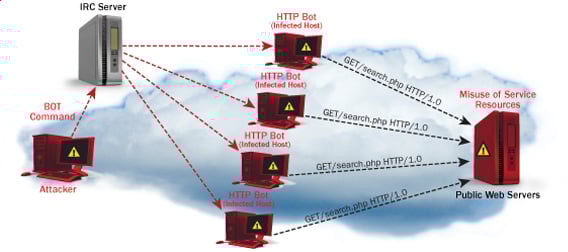
  • Botnets– these are multitudes of compromised computers on the Internet that can be used to perform a distributed denial of service attack.

DoS Protection: Prevent an attack

An organization can adopt the following policy to protect itself against Denial of Service attacks.

  • Attacks such as SYN flooding take advantage of bugs in the operating system. Installing security patches can help reduce the chances of such attacks.
  • Intrusion detection systems can also be used to identify and even stop illegal activities
  • Firewalls can be used to stop simple DoS attacks by blocking all traffic coming from an attacker by identifying his IP.
  • Routers can be configured via the Access Control List to limit access to the network and drop suspected illegal traffic.

Hacking Activity: Ping of Death

We will assume you are using Windows for this exercise. We will also assume that you have at least two computers that are on the same network. DOS attacks are illegal on networks that you are not authorized to do so. This is why you will need to setup your own network for this exercise.

Open the command prompt on the target computer

Enter the command ipconfig. You will get results similar to the ones shown below

Ultimate guide to DoS(Denial of Service) Attacks

For this example, we are using Mobile Broadband connection details. Take note of the IP address. Note: for this example to be more effective, and you must use a LAN network.

 Switch to the computer that you want to use for the attack and open the command prompt

We will ping our victim computer with infinite data packets of 65500

Enter the following command

ping 10.128.131.108 –t |65500

HERE,

  • "ping" sends the data packets to the victim
  • "10.128.131.108" is the IP address of the victim
  • "-t" means the data packets should be sent until the program is stopped
  • "-l" specifies the data load to be sent to the victim

You will get results similar to the ones shown below

Ultimate guide to DoS(Denial of Service) Attacks

Flooding the target computer with data packets doesn't have much effect on the victim. In order for the attack to be more effective, you should attack the target computer with pings from more than one computer.

The above attack can be used to attacker routers, web servers etc.

If you want to see the effects of the attack on the target computer, you can open the task manager and view the network activities.

  • Right click on the taskbar
  • Select start task manager
  • Click on the network tab
  • You will get results similar to the following

Ultimate guide to DoS(Denial of Service) Attacks

If the attack is successful, you should be able to see increased network activities.


Hacking Activity: Launch a DOS attack

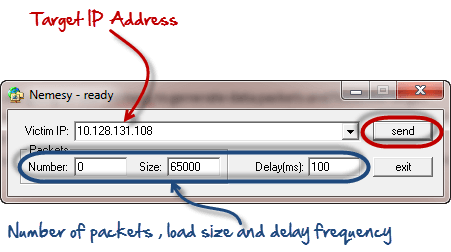
In this practical scenario, we are going to use Nemesy to generate data packets and flood the target computer, router or server.

As stated above, Nemesy will be detected as an illegal program by your anti-virus. You will have to disable the anti-virus for this exercise.

Ultimate guide to DoS(Denial of Service) Attacks

Enter the target IP address, in this example; we have used the target IP we used in the above example.

HERE,

  • 0 as the number of packets means infinity. You can set it to the desired number if you do not want to send, infinity data packets
  • The size field specifies the data bytes to be sent and the delay specifies the time interval in milliseconds.


Click on send button

You should be able to see the following results

Ultimate guide to DoS(Denial of Service) Attacks

The title bar will show you the number of packets sent

Click on halt button to stop the program from sending data packets.

You can monitor the task manager of the target computer to see the network activities.

Summary

  • A denial of service attack's intent is to deny legitimate users access to a resource such as a network, server etc.
  • There are two types of attacks, denial of service and distributed denial of service.
  • A denial of service attack can be carried out using SYN Flooding, Ping of Death, Teardrop, Smurf or buffer overflow
  • Security patches for operating systems, router configuration, firewalls and intrusion detection systems can be used to protect against denial of service attacks.
@EVERYTHING NT

More articles


How To Crack A Password

What is Password Cracking?

Password cracking is the process of attempting to gain Unauthorized access to restricted systems using common passwords or algorithms that guess passwords. In other words, it's an art of obtaining the correct password that gives access to a system protected by an authentication method.

Password cracking employs a number of techniques to achieve its goals. The cracking process can involve either comparing stored passwords against word list or use algorithms to generate passwords that match

How to crack password of an Application

In this Tutorial, we will introduce you to the common password cracking techniques and the countermeasures you can implement to protect systems against such attacks.

Topics covered in this tutorial

What is password strength?

Password strength is the measure of a password's efficiency to resist password cracking attacks. The strength of a password is determined by;

  • Length: the number of characters the password contains.
  • Complexity: does it use a combination of letters, numbers, and symbol?
  • Unpredictability: is it something that can be guessed easily by an attacker?

Let's now look at a practical example. We will use three passwords namely

1.  password

2.  password1

3.  #password1$

 For this example, we will use the password strength indicator of Cpanel when creating passwords. The images below show the password strengths of each of the above-listed passwords.

How to crack password of an Application

Note: the password used is password the strength is 1, and it's very weak.

How to crack password of an Application

Note: the password used is password1 the strength is 28, and it's still weak.

How to crack password of an Application

Note: The password used is #password1$ the strength is 60 and it's strong.

The higher the strength number, better the password.

Let's suppose that we have to store our above passwords using md5 encryption. We will use an online md5 hash generator to convert our passwords into md5 hashes.

 The table below shows the password hashes

PasswordMD5 HashCpanel Strength Indicator
password5f4dcc3b5aa765d61d8327deb882cf991
password17c6a180b36896a0a8c02787eeafb0e4c28
#password1$29e08fb7103c327d68327f23d8d9256c60


 We will now use http://www.md5this.com/ to crack the above hashes. The images below show the password cracking results for the above passwords.

How to crack password of an Application

How to crack password of an Application

How to crack password of an Application

As you can see from the above results, we managed to crack the first and second passwords that had lower strength numbers. We didn't manage to crack the third password which was longer, complex and unpredictable. It had a higher strength number.

Password cracking techniques

There are a number of techniques that can be used to crack passwords. We will describe the most commonly used ones below;

  • Dictionary attack– This method involves the use of a wordlist to compare against user passwords.
  • Brute force attack– This method is similar to the dictionary attack. Brute force attacks use algorithms that combine alpha-numeric characters and symbols to come up with passwords for the attack. For example, a password of the value "password" can also be tried as p@$$word using the brute force attack.
  • Rainbow table attack– This method uses pre-computed hashes. Let's assume that we have a database which stores passwords as md5 hashes. We can create another database that has md5 hashes of commonly used passwords. We can then compare the password hash we have against the stored hashes in the database. If a match is found, then we have the password.
  • Guess– As the name suggests, this method involves guessing. Passwords such as qwerty, password, admin, etc. are commonly used or set as default passwords. If they have not been changed or if the user is careless when selecting passwords, then they can be easily compromised.
  • Spidering– Most organizations use passwords that contain company information. This information can be found on company websites, social media such as facebook, twitter, etc. Spidering gathers information from these sources to come up with word lists. The word list is then used to perform dictionary and brute force attacks.

Spidering sample dictionary attack wordlist

1976 <founder birth year>

smith jones <founder name>

acme <company name/initials>

built|to|last <words in company vision/mission>

golfing|chess|soccer <founders hobbies

Password cracking tool

These are software programs that are used to crack user passwords. We already looked at a similar tool in the above example on password strengths. The website www.md5this.com uses a rainbow table to crack passwords. We will now look at some of the commonly used tools

John the Ripper

John the Ripper uses the command prompt to crack passwords. This makes it suitable for advanced users who are comfortable working with commands. It uses to wordlist to crack passwords. The program is free, but the word list has to be bought. It has free alternative word lists that you can use. Visit the product website http://www.openwall.com/john/ for more information and how to use it.

Cain & Abel

Cain & Abel runs on windows. It is used to recover passwords for user accounts, recovery of Microsoft Access passwords; networking sniffing, etc. Unlike John the Ripper, Cain & Abel uses a graphic user interface. It is very common among newbies and script kiddies because of its simplicity of use. Visit the product website http://www.softpedia.com/get/Security/Decrypting-Decoding/Cain-and-Abel.shtml for more information and how to use it.

Ophcrack

Ophcrack is a cross-platform Windows password cracker that uses rainbow tables to crack passwords. It runs on Windows, Linux and Mac OS. It also has a module for brute force attacks among other features. Visit the product website http://ophcrack.sourceforge.net/  for more information and how to use it.

Password Cracking Counter Measures

  • An organization can use the following methods to reduce the chances of the passwords been cracked
  • Avoid short and easily predicable passwords
  • Avoid using passwords with predictable patterns such as 11552266.
  • Passwords stored in the database must always be encrypted. For md5 encryptions, its better to salt the password hashes before storing them. Salting involves adding some word to the provided password before creating the hash.
  • Most registration systems have password strength indicators, organizations must adopt policies that favor high password strength numbers.

Hacking Activity: Hack Now!

In this practical scenario, we are going to crack Windows account with a simple passwordWindows uses NTLM hashes to encrypt passwords. We will use the NTLM cracker tool in Cain and Abel to do that.

Cain and Abel cracker can be used to crack passwords using;

  • Dictionary attack
  • Brute force
  • Cryptanalysis

We will use the dictionary attack in this example. You will need to download the dictionary attack wordlist here 10k-Most-Common.zip

For this demonstration, we have created an account called Accounts with the password qwerty on Windows 7.

How to crack password of an Application

Password cracking steps

  • Open Cain and Abel, you will get the following main screen

How to crack password of an Application

  • Make sure the cracker tab is selected as shown above
  • Click on the Add button on the toolbar.

How to crack password of an Application

  • The following dialog window will appear

How to crack password of an Application

  • The local user accounts will be displayed as follows. Note the results shown will be of the user accounts on your local machine.

How to crack password of an Application

  • Right click on the account you want to crack. For this tutorial, we will use Accounts as the user account.

How to crack password of an Application

  • The following screen will appear

How to crack password of an Application

  • Right click on the dictionary section and select Add to list menu as shown above
  • Browse to the 10k most common.txt file that you just downloaded

How to crack password of an Application

  • Click on start button
  • If the user used a simple password like qwerty, then you should be able to get the following results.

How to crack password of an Application

  • Note: the time taken to crack the password depends on the password strength, complexity and processing power of your machine.
  • If the password is not cracked using a dictionary attack, you can try brute force or cryptanalysis attacks.

Summary

  • Password cracking is the art of recovering stored or transmitted passwords.
  • Password strength is determined by the length, complexity, and unpredictability of a password value.
  • Common password techniques include dictionary attacks, brute force, rainbow tables, spidering and cracking.
  • Password cracking tools simplify the process of cracking passwords.
@EVERYTHING NT
Related posts
  1. Pentest Tools Android
  2. Pentest Tools Linux
  3. Hacking Tools Name
  4. Pentest Box Tools Download
  5. How To Install Pentest Tools In Ubuntu
  6. How To Hack
  7. Termux Hacking Tools 2019
  8. Hacker Search Tools
  9. Pentest Tools Nmap
  10. Hack Tools For Ubuntu
  11. Hacking Tools Usb
  12. Hack Tools Download
  13. Hack Tools For Games
  14. Tools Used For Hacking
  15. Hacker Tools Github
  16. Hack Tools For Pc
  17. Install Pentest Tools Ubuntu
  18. Pentest Tools Online
  19. Hacking Tools Github
  20. Hacking Tools Hardware
  21. Tools For Hacker

RainbowCrack


"RainbowCrack is a general purpose implementation of Philippe Oechslin's faster time-memory trade-off technique. In short, the RainbowCrack tool is a hash cracker. A traditional brute force cracker try all possible plaintexts one by one in cracking time. It is time consuming to break complex password in this way. The idea of time-memory trade-off is to do all cracking time computation in advance and store the result in files so called "rainbow table". It does take a long time to precompute the tables. But once the one time precomputation is finished, a time-memory trade-off cracker can be hundreds of times faster than a brute force cracker, with the help of precomputed tables." read more...

Website: http://www.antsight.com/zsl/rainbowcrack

Continue reading

  1. Hacking Tools For Pc
  2. Best Hacking Tools 2020
  3. Hacker Tools For Mac
  4. Hacking Tools Pc
  5. Hacking Tools Windows
  6. Pentest Tools Online
  7. Hacks And Tools
  8. Hacker Tools Linux
  9. Android Hack Tools Github
  10. Computer Hacker
  11. Game Hacking
  12. What Is Hacking Tools
  13. Hacker Tool Kit
  14. Pentest Tools Website
  15. World No 1 Hacker Software
  16. Hack Tools For Mac
  17. Hacker Tools Online
  18. Pentest Tools Linux
  19. Hacker Tools Github
  20. Pentest Tools Subdomain

Spaghetti: A Website Applications Security Scanner


About Spaghetti
   Author: m4ll0k   Spaghetti is an Open Source web application scanner, it is designed to find various default and insecure files, configurations, and misconfigurations. Spaghetti is built on Python 2.7 and can run on any platform which has a Python environment.

Spaghetti Installation:

Spaghetti's Features:
   Fingerprints:
  • Server:
  • Web Frameworks (CakePHP,CherryPy,...)
  • Web Application Firewall (Waf)
  • Content Management System (CMS)
  • Operating System (Linux,Unix,..)
  • Language (PHP,Ruby,...)
  • Cookie Security
   Discovery:
  • Bruteforce:Admin Interface
    Common Backdoors
    Common Backup Directory
    Common Backup File
    Common Directory
    Common FileLog File
  • Disclosure: Emails, Private IP, Credit Cards
   Attacks:
  • HTML Injection
  • SQL Injection
  • LDAP Injection
  • XPath Injection
  • Cross Site Scripting (XSS)
  • Remote File Inclusion (RFI)
  • PHP Code Injection
   Other:
  • HTTP Allow Methods
  • HTML Object
  • Multiple Index
  • Robots Paths
  • Web Dav
  • Cross Site Tracing (XST)
  • PHPINFO
  • .Listing
   Vulns:
  • ShellShock
  • Anonymous Cipher (CVE-2007-1858)
  • Crime (SPDY) (CVE-2012-4929)
  • Struts-Shock
Spaghetti Example:
python spaghetti --url example.com --scan 0 --random-agent --verbose


Related articles

Thousand Ways To Backdoor A Windows Domain (Forest)

When the Kerberos elevation of privilege (CVE-2014-6324 / MS14-068) vulnerability has been made public, the remediation paragraph of the following blog post made some waves:
http://blogs.technet.com/b/srd/archive/2014/11/18/additional-information-about-cve-2014-6324.aspx

"The only way a domain compromise can be remediated with a high level of certainty is a complete rebuild of the domain."

Personally, I agree with this, but .... But whether this is the real solution, I'm not sure. And the same applies to compromised computers. When it has been identified that malware was able to run on the computer (e.g. scheduled scan found the malware), there is no easy way to determine with 100% certainty that there is no rootkit on the computer. Thus rebuilding the computer might be a good thing to consider. For paranoids, use new hardware ;)

But rebuilding a single workstation and rebuilding a whole domain is not on the same complexity level. Rebuilding a domain can take weeks or months (or years, which will never happen, as the business will close before that).

There are countless documented methods to backdoor a computer, but I have never seen a post where someone collects all the methods to backdoor a domain. In the following, I will refer to domain admin, but in reality, I mean Domain Admins, Enterprise Admins, and Schema Admins.


Ways to backdoor a domain

So here you go, an incomplete list to backdoor a domain:

  • Create a new domain admin user. Easy to do, easy to detect, easy to remediate
  • Dump password hashes. The attacker can either crack those or just pass-the-hash. Since KB2871997, pass-the-hash might be trickier (https://technet.microsoft.com/library/security/2871997), but not impossible. Easy to do, hard to detect, hard to remediate - just think about service user passwords. And during remediation, consider all passwords compromised, even strong ones.
  • Logon scripts - modify the logon scripts and add something malicious in it. Almost anything detailed in this post can be added :D
  • Use an already available account, and add domain admin privileges to that. Reset its password. Mess with current group memberships - e.g. http://www.exploit-db.com/papers/17167/
  • Backdoor any workstation where domain admins login. While remediating workstations, don't forget to clean the roaming profile. The type of backdoor can use different forms: malware, local admin, password (hidden admin with 500 RID), sticky keys, etc.
  • Backdoor any domain controller server. For advanced attacks, see Skeleton keys 
  • Backdoor files on network shares which are commonly used by domain admins by adding malware to commonly used executables - Backdoor factory
  • Change ownership/permissions on AD partitions - if you have particular details on how to do this specifically, please comment
  • Create a new domain user. Hide admin privileges with SID history. Easy to do, hard to detect, easy to remediate - check Mimikatz experimental for addsid
  • Golden tickets - easy to do, hard to detect, medium remediation
  • Silver tickets - easy to do, hard to detect, medium/hard remediation
  • Backdoor workstations/servers via group policy
    • HKEY_LOCAL_MACHINE\ Software\ Microsoft\ Windows\ CurrentVersion\ RunOnce,
    • scheduled tasks (run task 2 years later),
    • sticky-keys with debug
  • Backdoor patch management tool, see slides here
[Update 2017.01.10]


Other tricks

The following list does not fit in the previous "instant admin" tips, but still, it can make the attackers life easier if their primary foothold has been disabled:

  • Backdoor recent backups - and when the backdoor is needed, destroy the files, so the files will be restored from the backdoored backup
  • Backdoor the Exchange server - get a copy of emails
  • Backdoor workstation/server golden image
  • Change permission of logon scripts to allow modification later
  • Place malicious symlinks to file shares, collect hashes via SMB auth tries on specified IP address, grab password hashes later
  • Backdoor remote admin management e.g. HP iLO - e.g. create new user or steal current password
  • Backdoor files e.g. on shares to use in SMB relay
  • Backdoor source code of in-house-developed software
  • Use any type of sniffed or reused passwords in new attacks, e.g. network admin, firewall admin, VPN admin, AV admin, etc.
  • Change the content of the proxy pac file (change browser configuration if necessary), including special exception(s) for a chosen domain(s)  to use proxy on malicious IP. Redirect the traffic, enforce authentication, grab password hashes, ???, profit.
  • Create high privileged users in applications running with high privileges, e.g. MSSQL, Tomcat, and own the machine, impersonate users, grab their credentials, etc. The typical pentest path made easy.
  • Remove patches from servers, change patch policy not to install those patches.
  • Steal Windows root/intermediate CA keys
  • Weaken AD security by changing group policy (e.g. re-enabling LM-hashes)
Update [2015-09-27]: I found this great presentation from Jakob Heidelberg. It mentions (at least) the following techniques, it is worth to check these:
  • Microsoft Local Administrator Password Solution
  • Enroll virtual smart card certificates for domain admins

Forensics

If you have been chosen to remediate a network where attackers gained domain admin privileges, well, you have a lot of things to look for :)

I can recommend two tools which can help you during your investigation:

Lessons learned

But guess what, not all of these problems are solved by rebuilding the AD. One has to rebuild all the computers from scratch as well. Which seems quite impossible. When someone is creating a new AD, it is impossible not to migrate some configuration/data/files from the old domain. And whenever this happens, there is a risk that the new AD will be backdoored as well.

Ok, we are doomed, but what can we do? I recommend proper log analysis, analyze trends, and detect strange patterns in your network. Better spend money on these, than on the domain rebuild. And when you find something, do a proper incident response. And good luck!

Ps: Thanks to Andrew, EQ, and Tileo for adding new ideas to this post.

Check out the host backdooring post as well! :)

More info